What Brightspacosaurus does
Brightspacosaurus (BSO) turns Markdown course material into a Brightspace Common Cartridge (.imscc) package. This demo course shows every feature. Each section below says what it does, links to the page where you can see it, and shows the minimal setting to turn it on; the user manual has the full reference.
Course material as Markdown
Write lessons, quizzes and readers as Markdown files in Git: versionable, diffable and friendly to AI-assisted editors, with no lock-in to Brightspace's editor. BSO builds the Brightspace package from the same files every time, so the repository stays the single source of truth.
See it in the demo: Demo Course Handbook.
Turn it on: create brightspacosaurus.config.json with three required fields:
{
  "courseName": "My course",
  "version": "1.0.0",
  "sourcesDir": "lessons/"
}
With the installed CLI (BSO 0.23.0 or newer), run:
bso build
bso pack
When working from the BSO source repository, use the local project tasks instead:
deno task build
deno task pack
Do not omit task: deno build tries to run a module named build, not the project task. BSO 0.23.0 replaces prepare with build, without an alias. Updating the source repository does not update an installed bso; install the matching release or use the local tasks.
Native quizzes
Quiz files (quiz- prefix) become QTI 1.2 assessments that Brightspace imports as real, scored quizzes, not as static pages. Inline code and formatting in questions and answers are kept.
Code in questions and answer options is syntax highlighted: code blocks are dark with Prism colors, inline code has a grey background (Figure 1).
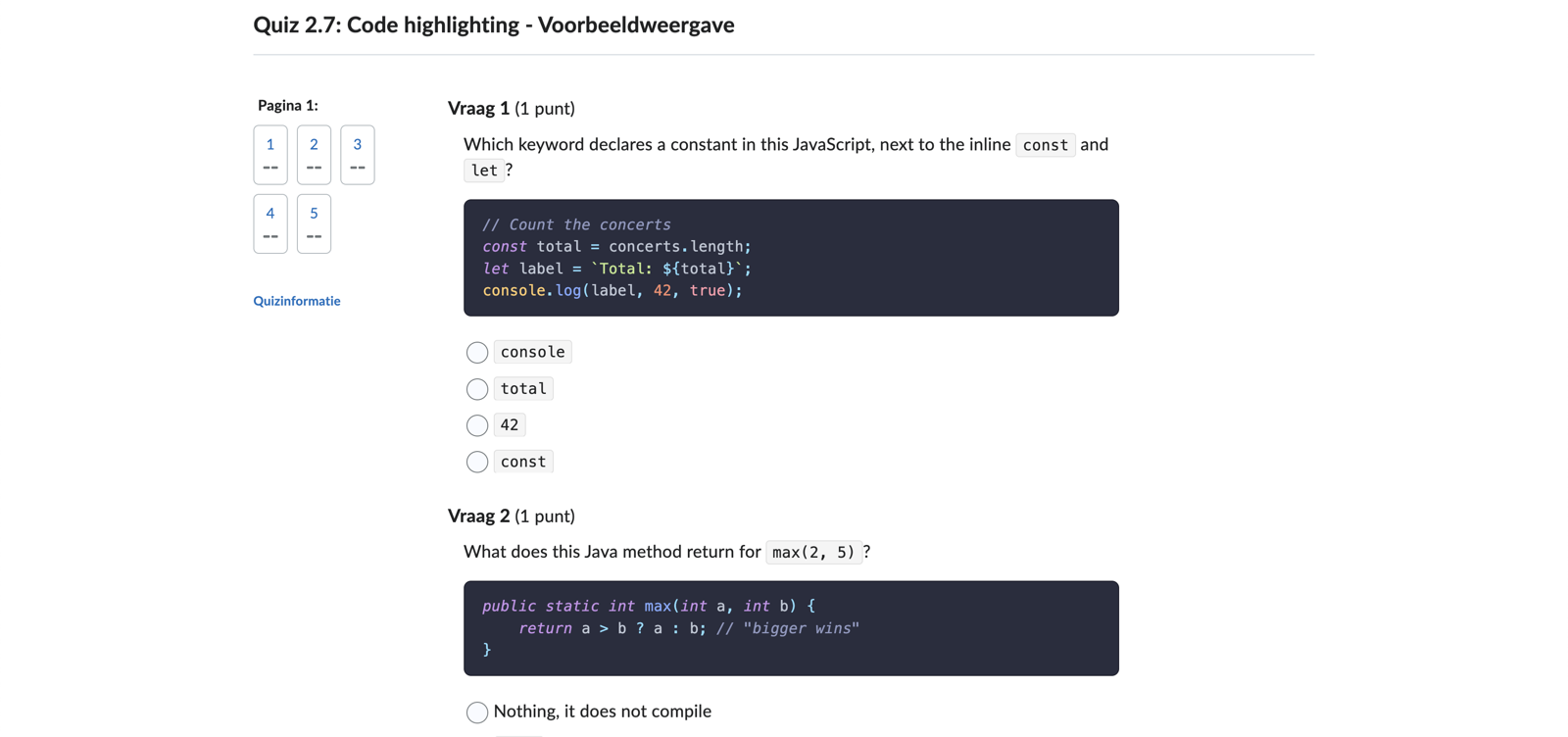
Figure 1: Code in quiz questions and answer options in the Brightspace preview. Look at the dark code blocks with colored keywords and strings, and at the grey inline code in the question and the options.
See it in the demo: Quiz 1.1: FizzBuzz and Quiz 2.7: Code highlighting.
Turn it on: name the file quiz-….md. Add these optional settings to your existing brightspacosaurus.config.json:
{
  "quiz": {
    "maxAttempts": 0,
    "shuffleAnswers": true
  }
}
More in the user manual.
Diagrams-as-code
PlantUML and Mermaid code blocks render to accessible images during the build. See the diagrams-as-code page.
Docusaurus preview
bso preview starts a live, hot-reloading Docusaurus site from the same Markdown, so you can check formatting, links, code blocks, diagrams and quizzes before importing anything into Brightspace. This online demo is such a preview.
See it in the demo: you are looking at it.
Turn it on: add the Docusaurus directory to the existing course configuration, then run bso preview:
{
  "docusaurusDir": "my-docusaurus-site"
}
Student progress from GitLab (Voortgangsverkenner)
For courses where students work in their own GitLab repositories. A tab on the teacher page fetches the status from GitLab: per student and repository the work items (issues), the commits and merge requests linked to them, and the students' comments. It summarises them as a green, orange or red stoplight and links straight to the commit, merge request or work item. It runs in the teacher's browser with a read-only GitLab token: no server, and no student data stored.
See it in the demo: For teachers, tab Voortgangsverkenner. The demo points to a fictitious GitLab server, so it loads but cannot fetch data.
Turn it on: a teacherDashboard block in the configuration and {@bso-teacher-dashboard} on its own line in the teacher page. Each teacher creates a read-only GitLab token. More in the user manual.
{
  "teacherDashboard": {
    "gitlabUrl": "https://gitlab.example.org",
    "groupPath": "my-course-2026",
    "subgroups": ["class-a", "class-b"],
    "repos": [{ "prefix": "n1-assignment", "label": "N1 Assignment" }]
  }
}
Reader PDFs
Readers (reader- prefix) become downloadable PDFs via pandoc, with a separate cover page: title, version, an optional cover image and an institution logo.
See it in the demo: the reader Testing basics starts with a link to its PDF, and Lesson 2.2: Readers and PDF explains how readers work.
Turn it on: put reader-….md files in the readers directory and add its path to the existing course configuration. The cover logo is optional. Needs pandoc.
{
  "readersDir": "readers/",
  "readerCoverLogo": "shared/logo.png"
}
More in the user manual.
Flashcards for core concepts
Term/definition lists become interactive flashcards, in a short and a long variant. See the flashcards for core concepts page.
Teacher-only page
One page in the course for teachers, hidden from students after import. BSO fills in which version of the course material and which BSO version were used for the package, so after an import you see at a glance whether Brightspace shows the current material. The page also hosts the Voortgangsverkenner.
See it in the demo: For teachers.
Turn it on: create for-teachers.md (or set "teacherPage") and put {@bso-versions} where the version table should go. More in the user manual.
To choose a different teacher page, add its path relative to sourcesDir to the existing course configuration:
{
  "teacherPage": "for-teachers.md"
}
Code blocks with a copy button
Syntax highlighting at build time and a one-click copy button. See the code blocks with a copy button page.
bso lint
Lints your course material like code, so you apply developer best practices to course development: broken includes, wrong quiz answer keys, diagram and flashcard mistakes, stray frontmatter in lessons and paragraphs hard-wrapped at a fixed column are reported with file:line:column before you export. It runs offline and says which folders it scanned.
Turn it on: run bso lint in the course repository, or in CI (the GitHub Pages workflow of this demo does).
See it in the user manual: Linting course material.
Configurable menu order
The Brightspace menu follows your folders, so a course per topic works as well as a course per week. See the configurable menu order page.